
By Julius Kilanko | E-commerce SEO Specialist | Updated May 2026
Quick Summary: Most Shopify and ecommerce store owners want free, organic traffic from Google, but they’re making fundamental mistakes that guarantee invisibility. In this guide, I’ll walk you through exactly why your store isn’t ranking, backed by what actually works in 2026, and give you a step-by-step roadmap to fix it.
Table of Contents
- Who This Guide Is For
- The Harsh Truth About Ecommerce SEO
- Part 1: Why Most Shopify Stores Never Rank
- Reason 1: Duplicate Content Problems (Shopify-Specific)
- Reason 2: Thin Product Descriptions That Google Ignores
- Reason 3: Zero Keyword Strategy — Targeting the Wrong Terms
- Reason 4: Slow Site Speed and Poor Core Web Vitals
- Reason 5: No Internal Linking Structure
- Reason 6: Missing or Broken Technical SEO Foundations
- Reason 7: No Backlink Authority — You’re a Ghost to Google
- Reason 8: Ignoring Search Intent Completely
- Reason 9: No Blog or Content Strategy
- Reason 10: Overlooking Local and Long-Tail Opportunities
- Part 2: How to Fix Your Ecommerce SEO — Step by Step
- Real Results: What Proper SEO Looks Like
- Your 90-Day SEO Action Plan
- Frequently Asked Questions
- Final Thoughts
Who This Guide Is For
This article is written specifically for:
- Shopify store owners who are getting little to no organic traffic from Google
- Ecommerce entrepreneurs running stores on WooCommerce, BigCommerce, or any other platform who are frustrated that their products don’t appear in search results
- Business owners who have been sold the dream of “passive organic traffic” but don’t know where to start
I’m not going to give you vague advice like “write good content” or “optimize your meta tags.” I’ve worked with dozens of ecommerce brands, and I’ve seen the same mistakes repeated over and over again. This guide covers every single one of them and more importantly, how to fix them.
The Harsh Truth About Ecommerce SEO
Let me be direct with you before we dive in.
Google processes over 8.5 billion searches per day. Ecommerce search terms things like “buy running shoes online,” “best skincare for oily skin,” or “affordable standing desk” are among the most competitive categories on the internet.
You are not just competing with other small Shopify stores. You are competing with:
- Amazon (which dominates product searches across virtually every niche)
- Established retailers with domain authority built over a decade
- Comparison and affiliate sites with thousands of backlinks
- Brand websites with massive marketing budgets
This doesn’t mean you can’t rank. Hundreds of independent Shopify stores do rank on Google’s first page and they drive consistent, profitable organic traffic. But they got there by doing things differently from the majority of store owners.
The gap between stores that rank and stores that don’t is almost never about the quality of their products. It’s almost always about strategy, execution, and patience.
Part 1: Why Most Shopify Stores Never Rank
Reason 1: Duplicate Content Problems (Shopify-Specific)
This is the most underappreciated technical problem unique to Shopify and it silently kills your rankings.
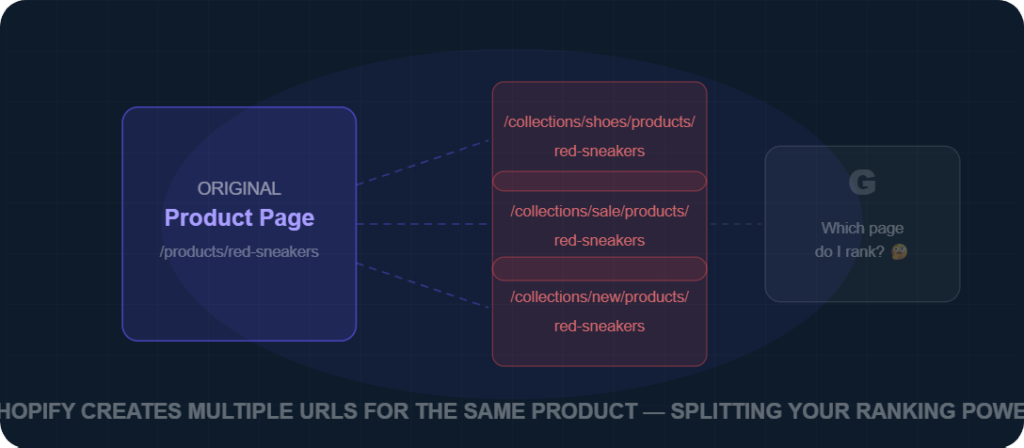
By default, Shopify generates multiple URLs for the same product. A product that lives in two collections, for example, might be accessible at:
yourstore.com/products/red-sneakersyourstore.com/collections/shoes/products/red-sneakersyourstore.com/collections/sale/products/red-sneakers
Google sees these as three different pages with the same content. Instead of concentrating ranking power on one URL, your authority gets split — and Google may choose to rank none of them, or worse, rank the wrong one.
The fix:
- Shopify has added canonical tags to handle this, but you should audit them regularly using tools like Screaming Frog or Ahrefs Site Audit.
- Avoid duplicating product pages across too many collections.
- Use your primary
/products/URL in all internal links, sitemaps, and external promotions.
Reason 2: Thin Product Descriptions That Google Ignores
The single biggest content mistake I see on ecommerce stores is using manufacturer descriptions or worse, writing just two sentences per product and calling it done.
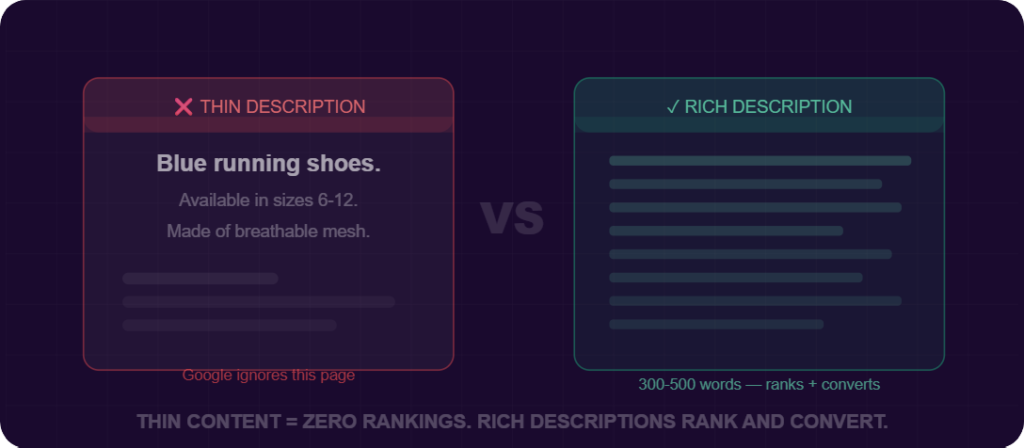
Here’s what thin content looks like:
“Blue running shoes. Available in sizes 6–12. Made of breathable mesh.”
Here’s why this fails:
- It gives Google no context about who this product is for, what problems it solves, or how it compares to alternatives.
- It provides no keyword depth there are dozens of related terms a well-written description would naturally include.
- It fails the human reader someone who lands on this page has no compelling reason to trust you or buy from you.
The fix: Write product descriptions that are at least 300–500 words for important products. Cover:
- Who the product is best for
- Key features and why they matter (not just what they are)
- Common questions or objections answered upfront
- Size, material, care instructions (where relevant)
- Social proof references (e.g., “Our most reviewed item with 400+ 5-star ratings”)
This isn’t just for Google. Detailed descriptions increase conversion rates. More information = more trust = more sales.
Reason 3: Zero Keyword Strategy — Targeting the Wrong Terms
Most Shopify store owners do keyword research in one of two ways:
- They don’t do it at all, and just guess what words to use.
- They target the most obvious, highest-volume keywords and get crushed by competition they can’t beat.
Example of a fatal keyword mistake:
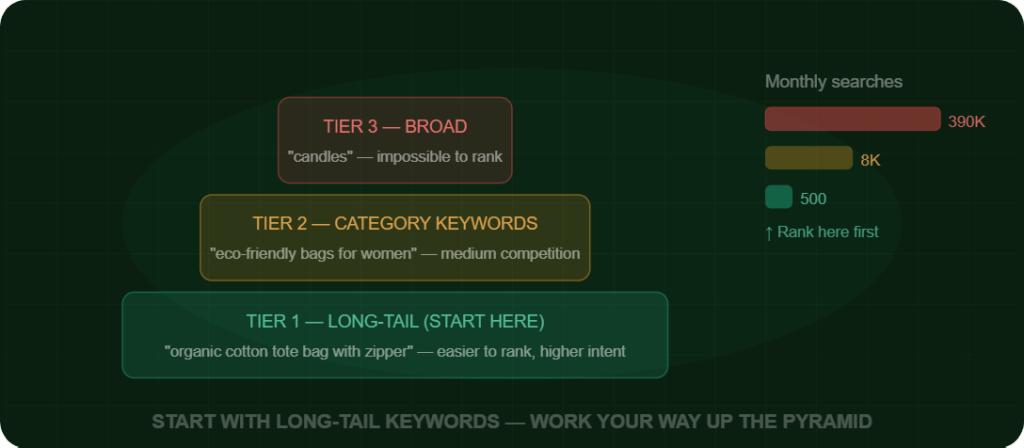
A new store selling handmade candles targets “candles” (390,000 monthly searches). They have zero domain authority. They will never, ever rank for this term not in year one, not in year five. Meanwhile, terms like “handmade soy candles for anxiety relief” or “coconut wax candles small batch” may have 500–2,000 monthly searches each, far less competition, and a buyer who is much closer to purchasing.
The fix — a three-tier keyword strategy:
Tier 1 — Long-tail product keywords (start here): These are 4–6 word phrases with clear buyer intent. They’re easier to rank for and convert at higher rates. Example: “organic cotton tote bag with zipper”
Tier 2 — Category/collection keywords (medium-term): Broader terms for your collection pages once you’ve built some authority. Example: “eco-friendly bags for women”
Tier 3 — Informational/blog keywords (for traffic and authority): These bring in top-of-funnel readers who can be converted into buyers over time. Example: “how to choose a sustainable bag brand”
Use tools like Google Keyword Planner (free), Ahrefs, Semrush, or Ubersuggest to research volume, competition, and related terms.
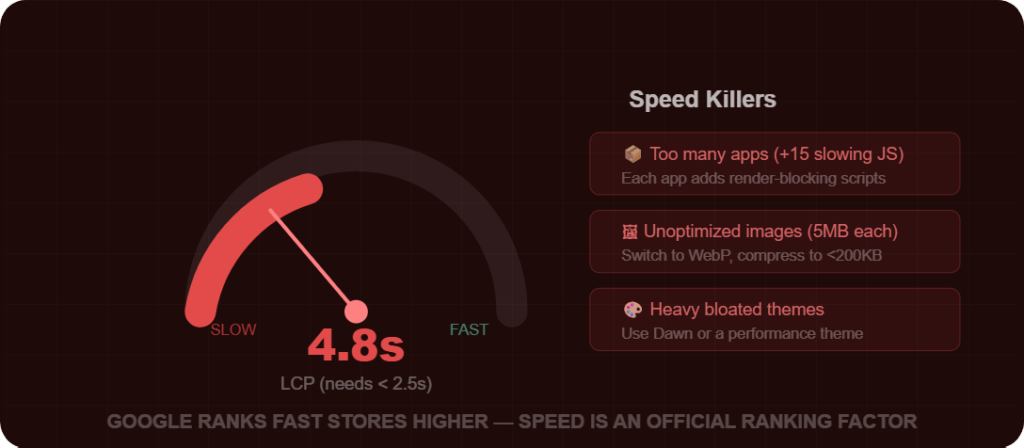
Reason 4: Slow Site Speed and Poor Core Web Vitals
Google made site speed an official ranking factor in 2021 with its Core Web Vitals update, and it remains critically important in 2026.
For Shopify stores specifically, speed problems are rampant because of:
- Too many apps : Every Shopify app you install adds JavaScript that slows your store. Many store owners have 15–25 apps installed, several of which they barely use.
- Unoptimized images : Product images uploaded at 5MB each will destroy your page load time.
- Heavy, bloated themes : Not all Shopify themes are built for performance.
What Google measures (Core Web Vitals):
- LCP (Largest Contentful Paint): How quickly your main content loads. Target: under 2.5 seconds.
- INP (Interaction to Next Paint): How responsive your page is to clicks/taps. Target: under 200ms.
- CLS (Cumulative Layout Shift): How much your page jumps around while loading. Target: under 0.1.
The fix:
- Audit your speed using Google PageSpeed Insights (free) and GTmetrix.
- Compress all images use WebP format where possible. Tools: Shopify’s built-in image optimizer, TinyPNG, or apps like Crush.pics.
- Audit and remove unused apps be ruthless.
- Consider switching to a performance-optimized theme like Dawn (Shopify’s official free theme, built for speed).
- Enable lazy loading for images below the fold.
Reason 5: No Internal Linking Structure
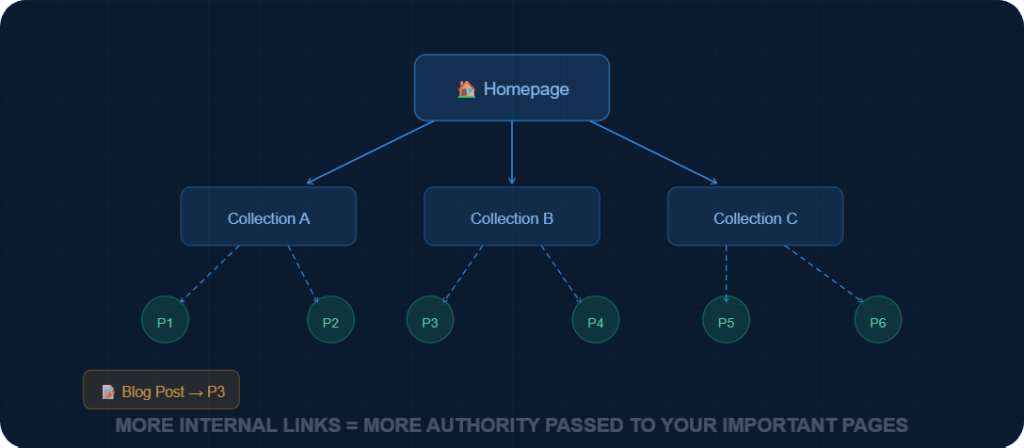
Internal links : links from one page on your site to another serve two purposes:
- They help visitors navigate your store and discover related products.
- They tell Google which pages are most important and help it understand the relationship between your content.
Most Shopify stores have almost zero intentional internal linking. Product pages don’t link to related products. Blog posts don’t link to relevant collection pages. The homepage links to a few collections and that’s it.
This is a massive missed opportunity.
The fix:
- On every product page, include “You may also like” or “Frequently bought together” sections, these create internal links automatically.
- In every blog post you write, link to at least 2–3 relevant product or collection pages.
- On collection pages, write a short description (150–200 words) at the top that links to subcategories or related collections.
- Build a proper site architecture: Homepage → Collections → Subcollections → Products
Think of internal links as roads on a map. The more roads lead to a page, the more important Google thinks it is.
Reason 6: Missing or Broken Technical SEO Foundations
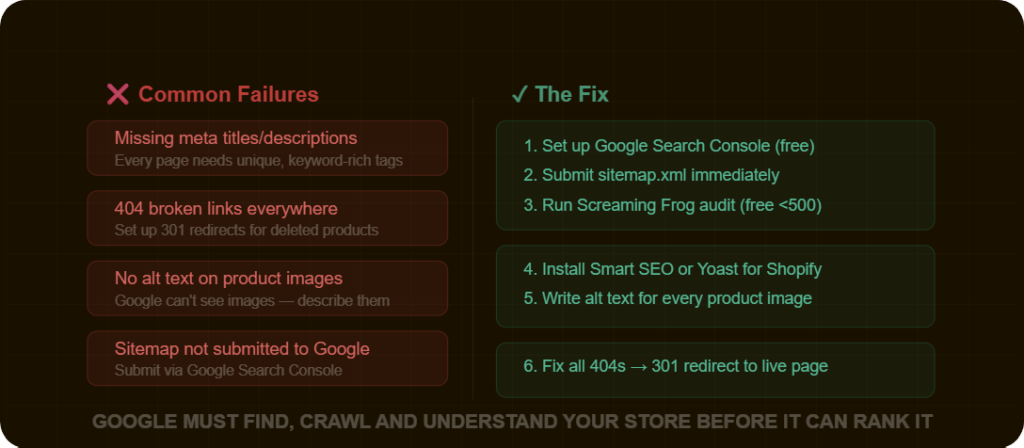
Before Google can rank your store, it needs to be able to find, crawl, and understand it. Many stores have technical problems that prevent this from happening.
Common technical SEO failures on Shopify stores:
Missing or incorrect meta titles and descriptions: Every page product, collection, and blog post should have a unique meta title (50–60 characters) and meta description (150–160 characters). These don’t just help rankings; they’re your ad copy in the search results. A compelling meta description increases click-through rates dramatically.
Broken links (404 errors): Every time you delete a product or change a URL without setting up a redirect, you create a dead end. Visitors bounce. Google notices.
Missing alt text on images: Google cannot see images. Alt text tells Google what an image is, helps with image search rankings, and improves accessibility. Every product image should have descriptive alt text. Example: “navy blue merino wool sweater men’s large” — not “IMG_00234.jpg.”
No XML sitemap submitted to Google: Shopify auto-generates a sitemap at yourstore.com/sitemap.xml but many store owners never submit it to Google Search Console. This slows down the time it takes Google to discover your pages.
The fix:
- Set up Google Search Console (free) immediately if you haven’t it’s the most important SEO tool for any store owner.
- Submit your sitemap.
- Use an SEO app like Yoast SEO for Shopify or Smart SEO to manage meta titles and descriptions at scale.
- Run a monthly crawl with Screaming Frog (free up to 500 pages) to find broken links and redirect them.
Reason 7: No Backlink Authority — You’re a Ghost to Google
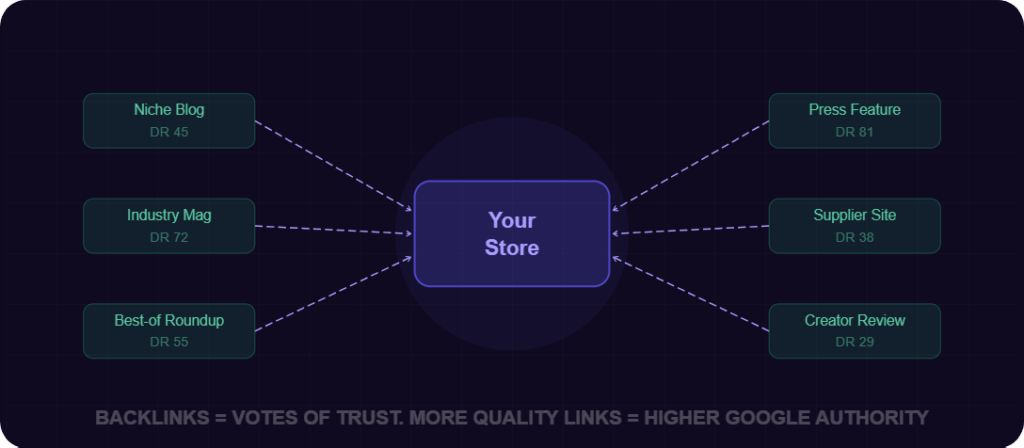
Backlinks — links from other websites pointing to yours are one of Google’s most powerful ranking signals. They work like votes of confidence: when a reputable website links to you, Google takes that as a signal that your site is trustworthy and authoritative.
Most new Shopify stores have zero backlinks from external sites. This means no matter how well you optimize your on-page SEO, you will struggle to rank for anything competitive.
The stores that dominate Google search results typically have:
- Features in industry blogs and publications
- Reviews on third-party sites
- Mentions from influencers and content creators
- Partnerships with complementary brands
The fix realistic link building for ecommerce stores:
1. Get featured in niche roundups: Search for articles like “best [product type] brands in [year]” and reach out to the authors. Offer a free sample in exchange for inclusion.
2. Pursue unlinked mentions: Use Google Alerts or Ahrefs to find websites that mention your brand name but don’t link to you. Reach out and ask them to add the link.
3. Create linkable assets: Original research, data, infographics, or comprehensive guides are things other sites naturally want to link to. A blog post like “We surveyed 500 customers about [topic]: here’s what we found” is far more linkable than a product description.
4. Supplier and partner links: If you work with suppliers, manufacturers, or complementary brands, ask if they’d be willing to list you as a stockist or partner with a link.
5. HARO (Help a Reporter Out): Journalists regularly look for expert sources. Sign up at Connectively.us (formerly HARO) and respond to relevant queries. A mention in a major publication can earn you high-authority backlinks.
Reason 8: Ignoring Search Intent Completely
This is one of the most sophisticated and most commonly ignored factors in ecommerce SEO.
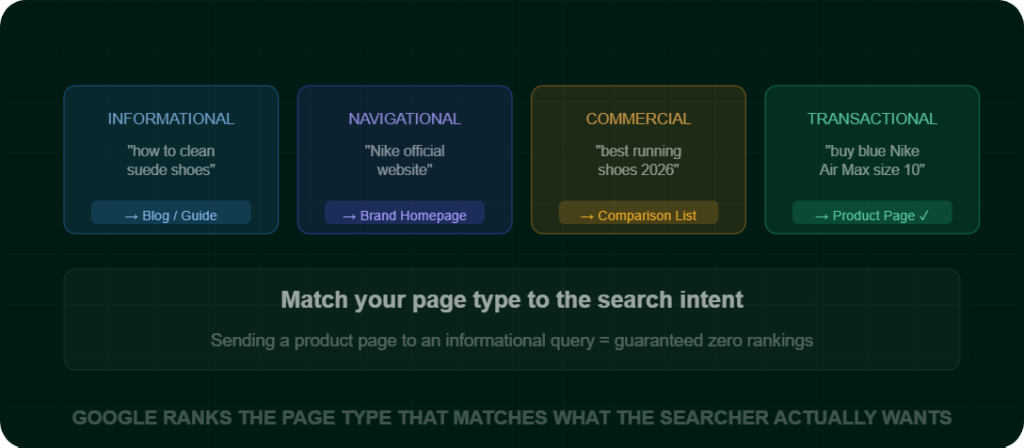
Search intent refers to why someone is searching for a particular term. Google has gotten remarkably good at understanding intent, and it ranks pages that match that intent best.
There are four types of search intent:
| Intent Type | Example Query | What Google Ranks |
|---|---|---|
| Informational | “how to clean suede shoes” | Blog posts, guides, how-to articles |
| Navigational | “Nike official website” | Brand homepages |
| Commercial | “best running shoes 2026” | Comparison articles, review roundups |
| Transactional | “buy blue Nike Air Max size 10” | Product pages, collection pages |
The mistake: Many stores try to rank a product page for an informational query, or try to rank a blog post for a transactional query. Neither works.
Example: If someone searches “how to choose a yoga mat,” they want a guide not a product page. If you try to rank your product page for that term, Google won’t show it, because it doesn’t match what the user expects to see. The right approach is to create a blog post titled “How to Choose the Right Yoga Mat (Beginner’s Guide)” and then link from that post to your yoga mat collection.
The fix: Before targeting any keyword, Google that exact phrase and look at what type of content ranks on page one. That’s the format Google wants. Match it.
Reason 9: No Blog or Content Strategy
Here’s a reality check: your product and collection pages can only target so many keywords. They’re commercial pages — they can rank for transactional and some commercial queries, but that’s it.
A blog changes everything.
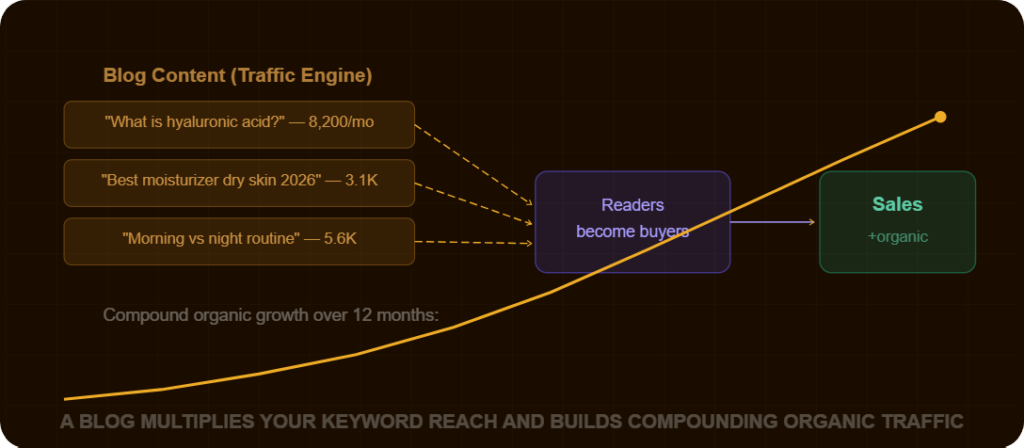
A well-maintained blog lets you:
- Target hundreds of informational and commercial keywords your product pages can’t touch
- Build topical authority signaling to Google that you’re an expert in your niche
- Create content that earns backlinks naturally
- Bring in top-of-funnel readers who later convert into customers
Example of a content strategy for a skincare store:
| Blog Topic | Target Keyword | Search Intent | Links To |
|---|---|---|---|
| “What is hyaluronic acid and is it right for your skin?” | “hyaluronic acid benefits” | Informational | Hyaluronic acid serum product |
| “10 Best Moisturizers for Dry Skin in 2026” | “best moisturizer dry skin 2026” | Commercial | Moisturizer collection page |
| “Morning vs. Night Skincare Routine: What’s the Difference?” | “morning vs night skincare routine” | Informational | Multiple product pages |
| “How to Build a Skincare Routine from Scratch” | “how to start a skincare routine” | Informational | Starter kit / bundle page |
Each article drives targeted traffic and funnels readers toward products. Over time, this content compounds a single well-optimized blog post can drive traffic for years.
The fix: Commit to publishing 2–4 high-quality blog posts per month. Prioritize depth over volume one 2,000-word expert post outperforms ten 300-word filler posts every time.
Reason 10: Overlooking Local and Long-Tail Opportunities
If you have a physical presence or serve specific regions, local SEO is a goldmine that most ecommerce stores completely ignore.
Searches like:
- “artisan candle shop Ohio”
- “sustainable clothing brand Ohio”
- “handmade leather bags near me”
…have meaningful volume and almost no competition compared to generic national or global terms.
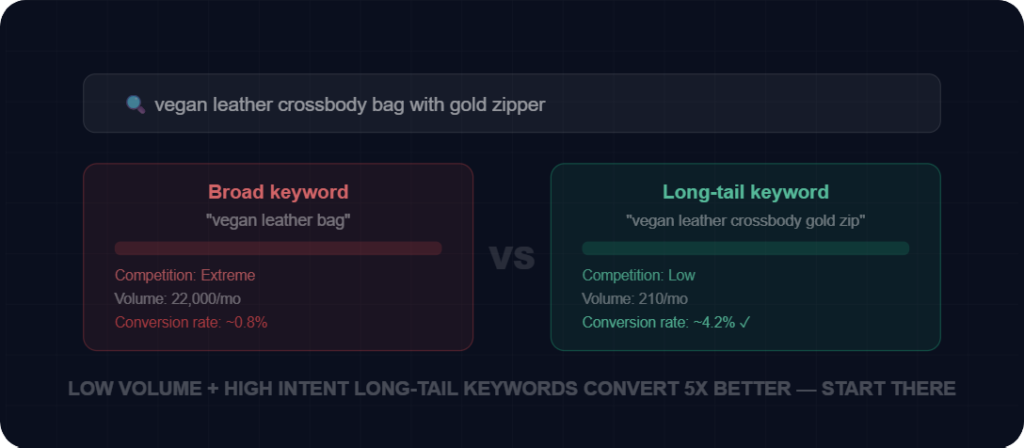
Long-tail keywords (4+ word phrases) are similarly overlooked. A search like “vegan leather crossbody bag with gold zipper” may have only 200 monthly searches but the person typing that knows exactly what they want and is ready to buy. These convert at dramatically higher rates than broad terms.
The fix:
- Set up and fully optimize your Google Business Profile.
- Add location-specific landing pages if you serve multiple cities or regions.
- Use keyword research tools to find long-tail variants of your core product terms and build dedicated pages or blog content around them.
Part 2: How to Fix Your Ecommerce SEO — Step by Step
Now that you understand the why, here’s exactly what to do about it in order of priority.
Step 1: Set Up Your SEO Measurement Tools
You cannot improve what you cannot measure. Before doing anything else:
Google Search Console (Free but mandatory)
- Go to search.google.com/search-console
- Verify your site ownership
- Submit your sitemap (
yourstore.com/sitemap.xml) - Check the Coverage report for crawl errors
- Check the Performance report to see which queries you’re already appearing for
Google Analytics 4 (Freeand mandatory)
- Set up GA4 to track organic traffic separately from paid
- Create a conversion goal for purchases
- This lets you measure SEO ROI over time
Ahrefs Webmaster Tools (Free)
- Free version gives you backlink data, site audit, and keyword rankings
- Run a site audit to find technical errors immediately
Step 2: Conduct Keyword Research for Every Core Page
Create a spreadsheet. For each of your main collection pages and top 10 product pages, identify:
- The primary keyword (highest relevant volume, realistic to rank for)
- 3–5 secondary/related keywords to include naturally in the content
- The search intent (transactional, commercial, informational)
Resources:
- Google Keyword Planner (free with a Google Ads account)
- Ubersuggest (limited free tier)
- Keywords Everywhere Chrome extension (affordable)
- Ahrefs or Semrush (paid, most powerful)
Step 3: Optimize Your Existing Pages
For each collection and product page, optimize:
Title Tag: Format: Primary Keyword | Secondary Keyword | Brand Name Example: Organic Cotton Tote Bags | Eco-Friendly | GreenCarry
Meta Description: Include your primary keyword, a key benefit, and a call to action. Example: “Shop our range of handmade organic cotton tote bags. Zero plastic, 100% sustainable. Free shipping on orders over $50.”
H1 Heading: One per page. Should include your primary keyword. Example: Handmade Organic Cotton Tote Bags
Body Content:
- Collections: Write 200–400 words of descriptive copy above or below the product grid
- Products: Write 300–600 words covering features, benefits, use cases, and FAQs
Image Alt Text: Rename every image file and write descriptive alt text for each one.
URL Structure: Keep it clean and keyword-rich. Good: /collections/organic-cotton-tote-bags Bad: /collections/col_78234
Step 4: Fix Your Technical SEO Issues
Run a Screaming Frog crawl (free up to 500 URLs) and fix:
- All 404 errors → set up 301 redirects to the most relevant live page
- Duplicate page titles → make every title unique
- Missing meta descriptions → write them for every page
- Pages with no internal links pointing to them (orphaned pages)
- Pages blocked from indexing by mistake (check robots.txt and noindex tags)
Check Google Search Console’s Core Web Vitals report. If pages are in the “Poor” or “Needs Improvement” category:
- Compress and resize all images
- Remove unused Shopify apps
- Consider a lighter theme
Step 5: Build Your Content Calendar
Based on your keyword research, plan 3–6 months of blog content:
- Aim for 2–4 posts per month
- Mix of informational (how-to, guides, explainers) and commercial (best-of, comparisons, reviews)
- Each post should be at minimum 1,200 words to 2,000+ for competitive topics
- Always end with an internal link to a relevant product or collection page
Content that earns backlinks naturally:
- Original research (“We analyzed 1,000 product reviews and here’s what we found”)
- Comprehensive ultimate guides (the best guide on a topic in your niche)
- Unique opinion pieces that challenge conventional thinking in your industry
Step 6: Build Backlinks Strategically
Start with the low-hanging fruit:
- Submit your store to relevant business directories (Google Business Profile, Bing Places, industry-specific directories)
- Reach out to bloggers and content creators in your niche offer product samples for honest reviews
- Look for “best [product category]” roundup articles and pitch for inclusion
- Find unlinked brand mentions and request links
- Create one linkable asset (comprehensive guide, original data, free tool)
Aim for quality over quantity. One link from a respected niche blog (DR 40+) is worth more than 50 links from low-quality directories.
Step 7: Monitor, Measure, and Iterate (Ongoing)
SEO is not a one-time task. Set a monthly routine:
Monthly SEO Review:
- Google Search Console: Which queries improved? Which dropped? Any new crawl errors?
- Check your Core Web Vitals report
- Review organic traffic in GA4: up or down from last month?
- Track keyword rankings using a tool like Ahrefs, Semrush, or SERPWatcher
Quarterly:
- Re-audit your top 20 pages and refresh any outdated content
- Analyze your backlink profile new links? Lost links?
- Review your content calendar and adjust based on what’s working
Real Results: What Proper SEO Looks Like
To set realistic expectations, here’s what you should expect on a typical timeline:
| Timeline | What to Expect |
|---|---|
| Month 1–2 | Technical fixes complete. Google starts discovering and recrawling improved pages. No major traffic changes yet. |
| Month 3–4 | Long-tail keyword pages start appearing in search results. Early ranking improvements on low-competition terms. |
| Month 5–6 | Measurable organic traffic growth. Blog content starts generating traffic. Some commercial keywords moving toward page 2–3. |
| Month 9–12 | Significant organic traffic for long-tail terms. Some competitive terms reaching page 1. ROI from SEO becomes clearly visible. |
| Year 2+ | Compounding growth. Content library drives consistent traffic. Authority building makes new pages rank faster. |
SEO is a long game. The stores that fail are the ones who give up at month three because they haven’t seen results yet. The stores that win are the ones who treat it like compound interest small consistent deposits that build into something significant over time.
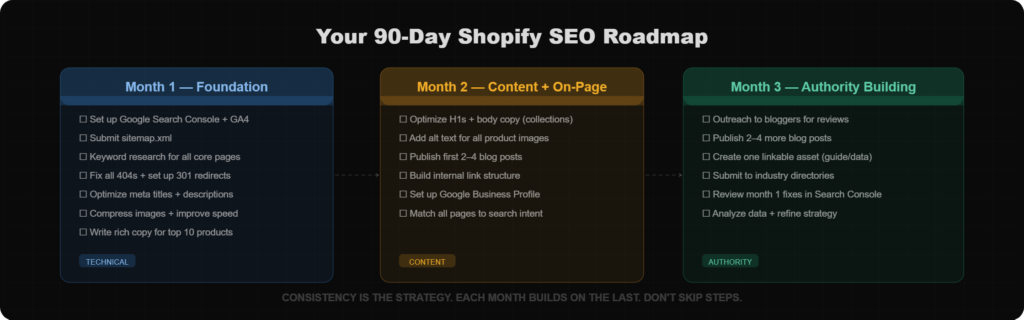
Here is a 90-Day SEO Action Plan
Month 1: Foundation
- [ ] Set up Google Search Console and GA4
- [ ] Submit your sitemap
- [ ] Conduct keyword research for all core pages
- [ ] Fix all technical errors (crawl errors, broken links, missing redirects)
- [ ] Optimize meta titles and descriptions for all pages
- [ ] Compress all images and improve page speed
- [ ] Write expanded descriptions for top 10 product pages
Month 2: Content and On-Page
- [ ] Optimize H1 headings and body content for all collection pages
- [ ] Write alt text for all product images
- [ ] Publish first 2–4 blog posts
- [ ] Build internal linking structure throughout your site
- [ ] Set up Google Business Profile (if applicable)
Month 3: Authority Building
- [ ] Begin outreach for backlinks (blogger reviews, roundup pitches)
- [ ] Publish 2–4 more blog posts
- [ ] Create your first linkable asset
- [ ] Submit to relevant industry directories
- [ ] Review Month 1 technical fixes and confirm resolved in Search Console
- [ ] Analyze early data and adjust content strategy based on what’s generating impressions
Final Thoughts
Let me leave you with this.
The reason most Shopify and ecommerce stores never rank on Google isn’t a mystery. It’s not because Google is biased toward big brands, or because SEO is too technical, or because organic traffic is “dead.”
It’s because most store owners don’t treat SEO as the long-term investment that it is. They expect results in three weeks. They write two-sentence product descriptions. They ignore technical issues. They never create content. And when nothing happens after a month, they conclude that SEO doesn’t work.
SEO works. It works for independent Shopify stores every single day. But it requires the same commitment you’d give to any other serious business growth channel.
Start with the foundation. Fix the technical issues. Optimize your core pages. Build a content strategy. Earn backlinks over time. Measure everything.
Do this consistently for 12 months, and you will have something most of your competitors don’t: a source of free, compounding, high-intent traffic that doesn’t stop when your ad budget runs out.
That’s what ranking on Google is worth and now you know exactly how to get there.
Have questions about your specific store’s SEO situation? Drop them in the comments below I read and respond to every one. and if you need our professional service, then checkout Our Service Page